Classic Solitaire - 2026
- 4.6
- Rating
- 1.00M
- Installs
- Free
- Price

 Analysis by App-foxy
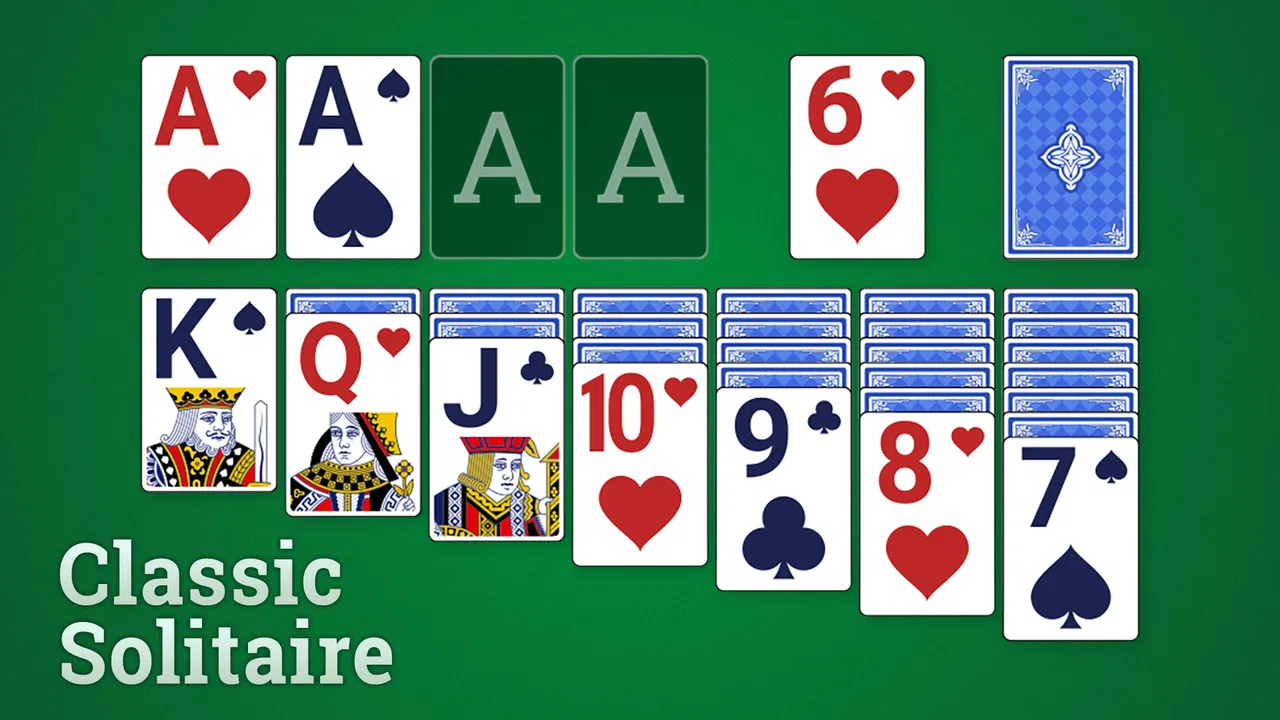
I keep coming back to card games when I want something quiet but still engaging, and Classic Solitaire from Fishplay fits that mood well. It is a straightforward solitaire game for Android, built around the familiar card-table format rather than a busy collection of unrelated features. After spending time with it, I see its main appeal clearly: it is easy to pick up, comfortable for short sessions, and familiar enough that most people can begin playing without a tutorial.
The game is free, carries an Everyone age rating, and has reached more than a million installs. Its average score sits at 4.5 from roughly 6,900 ratings, with about 540 written reviews. Those figures suggest that the simple approach works for a broad audience, although popularity alone does not make every solitaire app a good fit. What matters here is whether you want a calm, traditional card experience or something with deeper competition, social play, or a larger progression system.
How Classic Solitaire fits into everyday play
The most natural use case is a small break: waiting for an appointment, sitting with a coffee, or winding down before bed. I like that solitaire does not demand the same attention as a multiplayer card game. I can play a few moves, pause mentally, and return to the layout without feeling that I have let another player down. That makes this a practical choice for people who want a game that respects interruptions.
You May Also Like

 Blood Strike: 2.5 Anniversary
Blood Strike’s Loadouts Turn Every Drop Into a Tactical Gamble
A close look at Blood Strike’s custom loadouts: how fast access to signature weapons reshapes its battle royale rhythm, rewards preparation, and narrows the gap between fights.

 Pandora - Music & Podcasts
Pandora’s Music Is Easy to Start, but Harder to Recover
Pandora’s strength is its low-effort path from a seed to a station. Its weak spot is how much confidence it asks you to place in connection, setup, and quiet recovery.

 8 Ball Pool
 Is Built on Rivalries, Rematches, and Routine
A close look at the rivalries, rematches, shared routines, and unanswered safety questions that turn a quick pool match into a persistent mobile community.

 Samsung Music
’s Quiet Strength Is Playing What You Already Own
Its reach comes less from spectacle than from dependable access to a personal library. That simplicity is both the app’s strongest retention engine and its ceiling.

 AccuWeather: Weather Radar
AccuWeather Review: A Quick, Clear Forecast for Everyday Decisions
For everyday plans, the best forecast is the one you can understand quickly. AccuWeather makes rain timing, radar, and local conditions easy to act on, with a few trade-offs.

 Hill Climb Racing
Why Hill Climb Racing Still Turns Crashes Into One More Run
A tiny car, a bumpy hill and one more upgrade: Hill Climb Racing keeps resurfacing because its simple chaos makes every near-miss feel personal.
More From Our News Desk



It also works well on a shared household device. One person can finish a round, hand the phone or tablet to someone else, and let the next player start their own session. There is no need to coordinate a live match or arrange a time when everyone is available. In a family setting, that makes the game more like a small communal pastime than a group activity: people can take turns using the same device while keeping their play separate in practice.
That distinction is important. I would not describe it as a family game in the same sense as a board game that supports several players around one screen. The appeal is individual concentration, not shared decision-making. A parent, partner, or child may enjoy it on the same device, but each person is essentially playing alone. If your household wants conversation and direct interaction, a multiplayer card title will be a better choice.
For solo play, the classic format has a useful rhythm. You scan the layout, identify blocked cards, and decide which move opens the most useful space. Even when the rules are familiar, the order of decisions gives the game enough thought to remain interesting. I find it especially suitable for players who like gentle problem-solving without timers, opponents, or a complicated story demanding constant attention.
Starting without turning the setup into a project
Classic Solitaire is available as a free game, and its minimum operating-system requirement is Android 6.0. That makes it approachable for people using older Android hardware rather than only recent phones. For a shared device, this matters because a household may keep one tablet or spare phone for several years. Compatibility with an older system can be more useful than a long list of modern extras.
The developer is Fishplay, and the current version is 1.26.0402. When I think about installing it for someone else in the home, I would first check that the device is running a compatible Android version and has enough room for another app. I would also decide who is responsible for installing updates. That is not a game feature, but it is a sensible boundary on a shared device: one person handles maintenance, while other users simply open the game and play.
There is no reason to create a shared household identity around a simple solitaire game. I prefer keeping the device owner’s account and personal settings separate from the act of playing. If several people use the same phone, each player should understand that a shared screen is not the same as a private profile. Avoiding personal information in a casual game session is a good habit, particularly when children or guests may use the device later.
The Everyone rating makes the game suitable for a wide age range, but an age label should not be treated as a substitute for supervision of the device itself. The game may be appropriate for a child to play, while the phone or tablet may still contain messages, photos, purchases, or other apps that require adult judgment. In my view, the correct boundary is simple: the card game can be shared, but the device account and the rest of its contents should remain under the owner’s control.
I would also introduce it differently to different players. An adult who already knows solitaire can begin immediately. A younger player may need help understanding why some cards are temporarily unavailable or why a move that looks attractive can create a dead end later. That small explanation makes the game more rewarding than simply handing over the device and expecting the rules to be obvious.
Coordinating turns on one household device
Because the game is designed for individual play, coordination is mostly about courtesy rather than in-game tools. In my household, the cleanest approach would be to finish a round before handing over the device, rather than interrupting someone halfway through a layout. A short turn-taking agreement avoids arguments without pretending that the app provides a formal family-management system.
This is one of the less obvious strengths of a traditional solitaire game: it does not require everyone to be online at the same moment. If one person wants a quiet session in the morning and another wants to play later, both can use the same device without scheduling a match. That makes it more flexible than competitive card games, especially when household routines do not line up.
The trade-off is that there is no built-in social reason to return to the game together. You cannot rely on a shared challenge or a teammate to create conversation. If your goal is to help family members interact, I would choose a game with pass-and-play rules or a direct multiplayer mode instead. Classic Solitaire is better for peaceful coexistence than active collaboration.
For a shared phone, I would avoid treating the game as a place to settle whose turn it is. A simple verbal rule works better: one round per person, or a time agreed in advance. Since solitaire sessions can vary in length depending on the layout and the player’s decisions, a round-based rule may feel fairer than a strict timer. This is particularly useful when an experienced player and a beginner are sharing the device.
There is also a practical difference between sharing the app and sharing results. Someone may enjoy discussing a clever move or a difficult layout, but I would not assume that the game is built around household records or personal competition. If tracking progress matters to your family, you may prefer an alternative that clearly focuses on statistics, achievements, or player profiles. Here, the pleasure is in the act of arranging cards, not necessarily in comparing every session.
Why the familiar card format still works
The biggest advantage is immediacy. Classic Solitaire does not ask me to learn a new world, memorize characters, or understand a large economy before I can enjoy it. The card layout is the main event. That makes the game a good recommendation for someone who wants a digital version of a familiar pastime and does not want the usual clutter associated with larger mobile games.
I also appreciate the mental balance. The game is not completely passive, because each move can affect what becomes available next, but it is not exhausting either. I can play carefully when I want to think or make quick choices when I only have a few minutes. That flexibility gives it more staying power than a purely automatic distraction.
A useful habit is to look for moves that reveal hidden cards before moving cards simply because they fit somewhere. In a typical solitaire decision, opening a concealed card can create more options than making a tidy but unhelpful transfer. I also try not to empty a column too quickly unless I have a sensible plan for using the open space. These are small strategic choices, but they turn the game from random tapping into deliberate play.
Another practical tip is to pause before committing a move that changes the structure of the layout. When I am playing casually, I can be tempted by the first legal option. Taking a moment to scan other columns often prevents a sequence that leaves an important card buried. This is the kind of value a generic description misses: the game is simple to learn, but patience matters more than speed if you want to improve your decisions.
For a beginner sharing the device, I would encourage experimentation rather than correcting every move. Solitaire teaches its own consequences quickly. A player can see that uncovering one card may be more valuable than building a neat stack, and that some apparently harmless choices reduce future flexibility. That makes it suitable for quiet learning, provided the person helping does not turn a relaxing game into a lesson full of rules.
Where it may feel limited
The same simplicity that makes Classic Solitaire approachable can make it feel sparse to players who expect a modern mobile package. If you want a broad selection of variants, competitive ladders, daily objectives, animated rewards, or a strong sense of long-term progression, this may not hold your attention. I would not install it expecting a full card-game platform.
It is also not the right choice for someone who needs a social experience. There is no reason to gather friends around the app for a live contest, and a shared household should not mistake taking turns for multiplayer interaction. A dedicated online card game will suit players who want opponents, rankings, or direct communication more effectively.
Another limitation is the nature of solitaire itself: some layouts can feel less satisfying when the available choices narrow quickly. A player who prefers games where skill always overcomes the situation may become frustrated. Solitaire involves judgment, but the arrangement of cards still shapes what is possible. I see that uncertainty as part of the genre, though it is worth knowing before recommending the game to someone who wants complete control over every outcome.
The free price lowers the barrier to trying it, but “free” should not automatically be read as “perfect for every shared device.” I would still pay attention to how comfortable the app feels in your particular household, especially if several people dislike sharing one screen or prefer clearly separated personal spaces. The game itself is uncomplicated; the household arrangement around it is where most practical friction can appear.
Age, trust, and sensible device boundaries
With an Everyone rating, Classic Solitaire is an easy option for mixed-age households. A child can learn the basic card logic, an adult can use it as a short break, and an older relative may appreciate the familiar format. I would especially consider it for someone who finds action games too fast or large competitive apps too demanding.
Still, suitability depends on the player as much as the age label. A very young child may need help recognizing the cards and understanding the objective. An older player may prefer a larger screen if small cards are difficult to distinguish. For those reasons, a tablet can be more comfortable for shared use than a phone, even though the game is still convenient on a handset.
Trust also means being clear about who can use the device and when. I would not leave a shared phone unlocked simply because the game is harmless. Instead, I would let the player use it during an agreed period and return it afterward. This keeps the game separate from private messages and prevents accidental changes elsewhere on the device.
If a child is playing, I would explain that the app is only one part of the device. They should not assume that an Everyone rating means every action on the phone is equally appropriate. That conversation is more useful than making the game carry responsibility for household rules it was never designed to manage.
My household recommendation
I recommend Classic Solitaire to people who want a free, familiar card game for quiet solo sessions, especially when the same Android device may be used by several members of a home. Its broad age suitability, support for Android 6.0 and later, and uncomplicated format make it easy to introduce without reorganizing the household around it. Fishplay has kept the focus on the card table, which is exactly why the game feels approachable.
I would choose it for a parent who wants a calm activity between errands, a partner who likes traditional card games, or an older relative who prefers familiar rules to fast mobile action. It is also a good fit for a spare tablet that different people use at different times. The most effective arrangement is to treat it as a personal turn-based pastime on a shared device, with clear expectations about when the device is available and who looks after updates.
I would skip it for a household searching for cooperative play, deep customization, competitive rankings, or a large collection of card variants. In those cases, a more feature-heavy solitaire collection or a multiplayer card app will probably provide better value, even if it takes longer to learn. Classic Solitaire succeeds by staying focused, and that focus becomes a weakness only when you wanted something broader.
After using it, my view is pleasantly uncomplicated: this is a dependable way to fill a few quiet minutes, not a game that needs to dominate your attention. The best reason to install Classic Solitaire is its low-pressure rhythm and easy handoff between household users. If that matches what you want, its straightforward card play is likely to feel comfortable rather than limited. If you need social competition or a richer progression system, look elsewhere; for calm, familiar solitaire on an accessible Android device, it remains a sensible choice.
FAQs for Classic Solitaire - 2026
01What is Classic Solitaire - 2026 and how does it differ from other Solitaire apps?
Classic Solitaire - 2026 is a modern take on the classic card game, designed to provide a seamless and enjoyable experience on both Android and iOS devices. Unlike other Solitaire apps, it features updated graphics, customizable themes, and daily challenges that keep the gameplay fresh and engaging. Whether you're a beginner or a seasoned player, this app offers varying levels of difficulty to suit your skill level.
02Is Classic Solitaire - 2026 free to download and play?
Yes, Classic Solitaire - 2026 is free to download and play. However, it does offer in-app purchases for additional features, such as exclusive themes, power-ups, and an ad-free experience. While these purchases can enhance gameplay, they are entirely optional, allowing users to enjoy the game fully without spending money.
03What are the device requirements for installing Classic Solitaire - 2026?
To install Classic Solitaire - 2026, your device must be running Android 5.0 or later, or iOS 10.0 or later. The app is optimized for both smartphones and tablets, offering a smooth performance across various screen sizes. Make sure you have enough storage space, as the app may require additional data for updates and new features.
04Does Classic Solitaire - 2026 have multiplayer options?
Currently, Classic Solitaire - 2026 is designed as a single-player game. However, it includes a leaderboard feature where you can compete against friends and players globally by comparing scores. This aspect adds a competitive edge without direct multiplayer gameplay, allowing you to challenge yourself and others to achieve higher rankings.
05How often does Classic Solitaire - 2026 receive updates?
Classic Solitaire - 2026 receives regular updates to improve performance, fix bugs, and introduce new features. Users can expect fresh content such as new themes, daily challenges, and seasonal events. The development team is committed to enhancing the user experience, ensuring players have a reason to return frequently.
Pros
- Smooth and intuitive user interface.
- Customizable card designs and backgrounds.
- Offers daily challenges and rewards.
- Offline play available without interruptions.
- Low battery consumption during gameplay.
Cons
- Contains occasional pop-up ads.
- Limited hints in free version.
- No multiplayer or social features.
- Requires in-app purchases for extras.
- Basic sound effects could be improved.

Classic Solitaire - 2026
Gallery